用自动化清理孤儿进程,保持 Codex 流畅运行
通过定时清理测试残留进程与可丢弃缓存,降低资源占用,但需严格避免误杀和数据损失。
原始内容
Prompt: Create an automation that runs every 20 minutes to keep Codex running smoothly. Safely stop stale or orphaned headless processes, clear disposable caches when safe, and audit for other low-risk performance improvements. Never interrupt active work, close Codex, or delete user data. Run it immediately.
codex tip: set an automation that keeps your computer running smoothly. - kill all headless instances after test runs - clear cache - audit computer for further opportunities This can be a Luna agent, it will cost you near nothing This is the difference between my computer running at 100ºC and 40. Unusably laggy vs smooth as butter!
中文译文
机器翻译,保留原文供核对。
提示词: 创建一个每 20 分钟运行一次的自动化,让 Codex 保持顺畅运行。安全地停止陈旧或孤立的无头进程,在安全时清理可丢弃的缓存,并审查其他低风险的性能改进。绝不要打断正在进行的工作、关闭 Codex 或删除用户数据。立即运行它。
Codex 小技巧:设置一个自动化,让你的电脑保持流畅运行。 - 测试运行结束后杀掉所有无头实例 - 清理缓存 - 审查电脑,寻找更多优化机会 这可以是一个 Luna agent,几乎不会花你什么钱 这就是我的电脑在 100ºC 和 40ºC 下运行的区别。卡到没法用 vs 丝般顺滑!
深度解析
是什么 这是一条面向 Agent 与开发环境维护的经验型观点:让自动化任务每 20 分钟检查 Codex 相关的陈旧或孤儿 headless 进程,在确认安全后停止它们,清理可丢弃缓存,并顺带寻找低风险的性能改进。它把开发机稳定性视为持续运维问题,而不是等到 CPU、温度或响应速度恶化后再人工处理。
核心设计 关键不是定时器本身,而是安全边界:不能打断活跃工作、关闭 Codex、删除用户数据,并要求立即执行一次。理想实现还应采用进程白名单或标签、状态与父子关系判断、dry-run、超时和可回滚日志,让清理动作可解释、可审计。缓存也必须按可重建、非用户生成数据区分,避免把构建产物、登录状态或项目状态误判为垃圾。
关键洞察 测试工具常留下 headless 浏览器、子进程和临时文件;持续回收能减少 CPU、内存和温度峰值,改善 Agent 并行开发体验。真正可复用的是资源生命周期管理与轻量巡检思路,而非某个特定平台或代理产品。
边界与风险 原文没有给出识别规则、权限模型、缓存目录、系统平台或实测数据,温度从 100ºC 降到 40ºC 只能视为个人轶事,不能当作普遍效果。误杀、竞态、权限失败和反复重启都可能让问题更隐蔽;应先观测告警,再小范围启用,并保留日志与人工暂停开关。
精选追评与案例
指出高频运行会消耗 token,并给出用完成/合并钩子做确定性清理、整机检查按需执行的边界。
Every 20 mins is a very frequent probe that is going to consume tokens IMO Add a completion/ merge hook, that checks for those instances remaining from the worktree, to kill those instances. This will be a deterministic script (no tokens ) involved. And your global PC check you keep it on demand / skill when you feel the lag. Just an advice.
中文译文 · 机器翻译
每 20 分钟一次是非常频繁的探测,我认为会消耗 token。 加一个完成/合并钩子,检查 worktree 中残留的那些实例并杀掉。这会是一个确定性脚本(不涉及 token)。 而你全局的电脑检查,可以留到感觉卡顿时按需运行/作为技能调用。 只是建议。
补充清理日志与时间戳,便于排查 Codex 异常是否由自身脚本造成。
@ForwardEditor Add one thing. Make it append what it killed to a log file with a timestamp. The first time Codex behaves strangely, you need to know whether your own cleanup did it. I lost half a day to a cron job I wrote and forgot.
中文译文 · 机器翻译
补充一点。让它把杀掉的内容连同时间戳追加到日志文件。Codex 第一次行为异常时,你需要知道是不是你自己的清理造成的。我曾因为一个自己写的、后来忘了的 cron job 损失了半天时间。
给出先做 48 小时审计再清理的实操参数,避免盲目清理。
@ForwardEditor I did the same but started it with an audit for 48h so it can first check if there is a need and then see where it’s located. Helps also to map better the areas where there is a true need for the cleanup :)
中文译文 · 机器翻译
我也做了同样的事,但先跑了 48 小时的审计,这样它能先检查是否有需要,再查看问题所在。这也有助于更好地标出真正需要清理的区域 :)
分享 30 分钟频率过密及同时跑 8-12 个 agent 的实际经验,补充运行条件和通知策略。
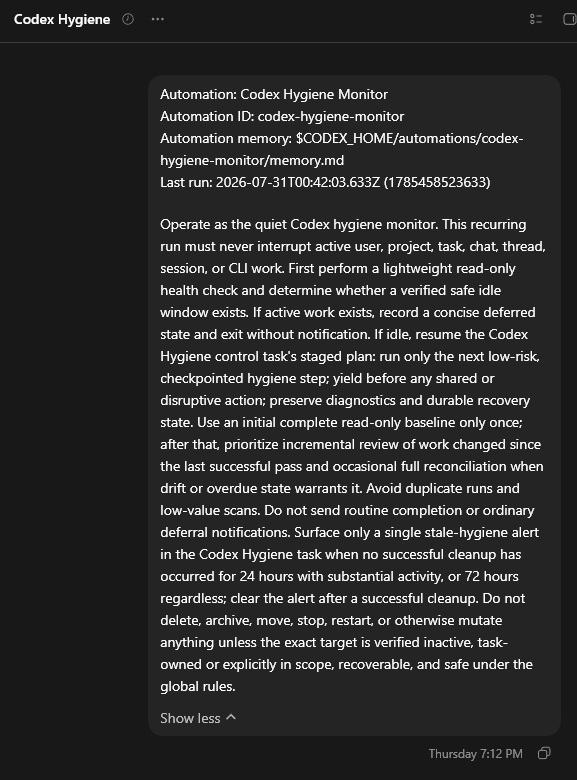
@ForwardEditor this helps me keep things in order while not causing issues for active work and only notifies if it has been able to run for a while. Was doing every 30 mins but found it to be a bit too intensive as often game and run 8-12 agents at a time or so https://t.co/Ob2XzDLGBh
中文译文 · 机器翻译
这能帮我保持秩序,同时不给正在进行的工作造成问题,而且只有在它已经运行了一段时间后才通知。我原本每 30 分钟跑一次,但发现有点太密集,因为我经常玩游戏并同时运行 8-12 个 agent 左右 https://t.co/Ob2XzDLGBh
提供现成 nanny 技能的使用经验,并提醒新模型下未必必要、复杂会话效果有限。
@ForwardEditor I built a skill called nanny that does just this and a bunch more. With latest models though it doesn't really seem to be necessary. I used it when I was on vacation to keep some complex sessions going and the results were not really that good.
中文译文 · 机器翻译
我构建了一个叫“nanny”的技能,做的正是这件事,还多做了一些。不过用最新的模型时,它似乎并不是真的必要。我在休假时用它来维持一些复杂会话继续运行,结果其实并不太好。