正在加载陈远的个人网站

提示词

2026年10月23日 收录
  1. X · @Voxyz_ai引用

    Agent Skills 标准捐献与技能编写六条铁律

    Agent Skills 标准捐入 Linux Foundation,附官方技能编写最佳实践与一键沉淀技能的提示词。

    Anthropic just donated the Agent Skills standard to the Linux Foundation, the same home MCP went to. Since it launched last October, 𝟭 𝗺𝗶𝗹𝗹𝗶𝗼𝗻 𝘀𝗸𝗶𝗹𝗹𝘀 have been published and installed nearly 280 million times, and 70+ agent platforms support it, including ChatGPT, Cursor, GitHub Copilot and VS Code.
    
    Over that year, how to write a skill settled into a standard method, and the official guide went to the foundation too. The 6 most useful rules from it:
    → Do the task with your agent for real first, then turn the steps that worked, the corrections you made, the input and output formats and the context you added into the skill. A model writing from general knowledge gives you filler like "handle errors appropriately"
    → Ask of every line: would the agent get this wrong without it? If not, cut it
    → At startup the agent reads only the name and description, so the description decides whether the skill ever gets used. Write it as "use this skill when...", lean pushy, list the cases users won't spell out, and stay under 1,024 characters
    → Keep SKILL.md under 500 lines and 5,000 tokens, move details into references/, and say when to read which file
    → Hard-code the exact command for fragile steps, explain the why where there's room for judgment, and when there are several ways to do something, give one default
    → In many skills the most valuable part is 𝘁𝗵𝗲 𝗴𝗼𝘁𝗰𝗵𝗮𝘀 𝗹𝗶𝘀𝘁: every time you have to correct the agent, add a line
    
    Right after your agent finishes a task you hand it often, send this to Claude Code in the same session to save how you did it as a standard skill 👇
    "Following https://t.co/YN17Wv07wD, turn the task we just did into a skill. Use only the steps that worked in this conversation, the places I corrected you, and related fixes in CLAUDE.md, AGENTS.md and the git history; don't fill gaps from general knowledge. Write the description as 'use this skill when...', include cases I didn't spell out but that should trigger it, and keep it under 1,024 characters. Keep SKILL.md under 500 lines, move details into references/ with a note on when to read each file, and give the gotchas their own section. Use lowercase letters, numbers and hyphens for the name, matching the folder name. Finally, write 2-3 real test cases in evals/evals.json (prompt plus expected output), run each one, and show me the results and what you did."
    提示词 · 技能 · Agent 工程 · AI 应用

  2. X · @mattpocockuk

    用「一次一问」的斜杠命令澄清欠定义需求

    Matt Pocock 分享:问题极度欠定义时,用 /grill-me 让 AI 一次只问一个问题来做需求澄清。

    I still sometimes say:
    
    /grill-me about this, one question at a time
    
    Usually when I REALLY have no idea what I'm building. When the problem is hugely underspecified and a single Q&A round could send us in massively different directions

    提示词 · 需求澄清 · 提问策略 · 逐问引导 · 技能 · Agent 工程

  3. X · @leo_xiaolei图片

    手绘画风提示词 Skill:21 套跨模型生图配方库

    工具无关的手绘画风提示词配方 Skill,内置 21 套已验证画风,跨图像模型保障风格一致性输出。

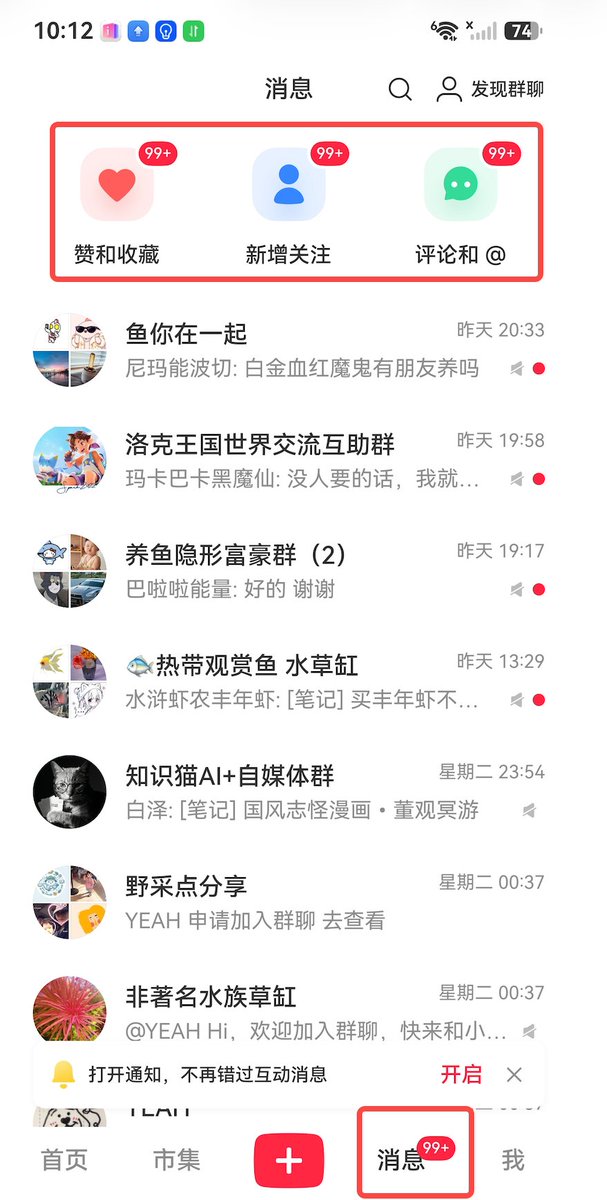
    国庆期间用自己的小红书账号,验证了一下这款手绘 Skill
    
    99+ 拿到手软,已经开始拿到结果了!
    
    什么样的 Skill 是有价值的?真的可以帮人带来结果。
    
    什么样的 Skill 是长期稳定、不受模型影响的?授人以渔,不限定内容
    
    我的手绘风格 Skill,就是这样一款 Skill
    
    它服务于风格,你可以用它生产任何内容,知识卡片、绘本、故事、笔记样样儿都能搞定。
    
    它不受限于模型强弱、迭代,所有上架的风格都经过了一致性、兼容性调试,它服务于底层风格,让它在 MJ、Nanobanana、GPT Image 等模型中均有所表现,并且一致性有一定的保障。
    
    非广,你用我推荐,我用我也用。我已经拿到结果了~
    
    地址:https://t.co/OaZR3VdBO8
    
    ps:解释下为什么它的风格偏少?因为任何一个风格都要负责。就这么简单
    手绘画风提示词 Skill:21 套跨模型生图配方库 的效果图

    提示词 · 技能 · 手绘风格 · 多模型适配 · AI 应用 · 知识卡片

  4. X · @0xGky图片

    Seedance 2.5 视频导演 Skill:提示词与分镜一站式生成

    开源 Agent Skill 把视频创意整理成 Seedance 2.5 可执行脚本、导演方案与即用提示词,附人物锁定与冲突诊断。

    一位AI圈的大佬 ,他搞了个叫 Seedance 2.5 导演 Skill 的东西。
    
    操作流程特别简单,总共就三步:
    1️⃣ 先让它帮你把提示词生成出来
    2️⃣ 把参考角色扔进去,直接开跑
    3️⃣ 通常一遍就能成,不用来回重试搞得人崩溃
    这个工具不只是替你写提示词,还会顺带帮你把内容调优,生成出来的视频看起来挺自然,那种明显的AI感能削掉不少。
    
    🔗 https://t.co/a6NSx4n0qG
    Seedance 2.5 视频导演 Skill:提示词与分镜一站式生成 的效果图

    提示词 · 视频提示词 · 技能 · 工作流 · AI 视频

  5. X · @mattpocockuk

    codebase-design:用删除测试清理代码库冗余抽象

    Matt Pocock 分享的 Agent 技能提示词,通过删除测试找出浅模块与冗余抽象,持续精简代码库。

    mattpocock/skills prompt of the day:
    
    /codebase-design Take a look in the repo for shallow modules, applying the deletion test and look for candidates for deletion.
    
    Helps kill unnecessary abstractions.

    提示词 · 软件工程提示词 · 技能 · 代码库设计 · 删除测试 · 架构优化 · Agent 工程

  6. X · @mattpocockuk

    用会话复盘提示词提升仓库导航性以节省 Token

    Matt Pocock 分享一条让编码 Agent 复盘近 10 次会话、改进仓库导航以节省 Token 的提示词。

    Prompt of the day:
    
    /retro read my last 10 coding agent sessions and find ways to make my repo easier to navigate. Find where agents take too long to find relevant information, or rely on out-of-date docs.
    
    Improving navigability is such an underrated way to save tokens.

    提示词 · 软件工程提示词 · 技能 · 代码库导航 · 上下文管理 · 会话复盘 · 研发效能

  7. X · @iamsahaj_xyz引用

    必备技能:代码库设计与零技术债清理

    作者每个 PR 都先用 /codebase-design 与 /zero-tech-debt 技能,借删除测试清理浅模块与多余抽象。

    I don't push a single PR that doesn't use /codebase-design and /zero-tech-debt

    提示词 · 软件工程提示词 · 技能 · 技术债 · 代码库设计 · 研发效能

  8. X · @xiaohu视频

    用 /checkup prompt-audit 体检修复 Claude Code 配置

    一条命令审计 CLAUDE.md、技能与 Agent 配置,清理失效指令,释放模型真实能力。

    使用这个命令
    
    可以修复和整理你的Claude.md和技能
    
    /checkup prompt-audit
    
    它会检查你的 CLAUDE.md、技能和Agent,找出你的当前模型不再需要的指令和阻碍它发挥能力的提示内容,还会修复你的技能...
     https://t.co/wo0ywbyh72

    提示词 · 技能 · Agent 工程 · 研发效能 · 提示词清理

  9. X · @leo_xiaolei图片

    手绘风格配方与儿童内容流水线

    拆解固定IP手绘风格、儿童心理学选题与AI批量生产,并介绍可复用的手绘提示词配方仓库。

    (抱歉,之前的帖子链接放错了,重新发下)
    
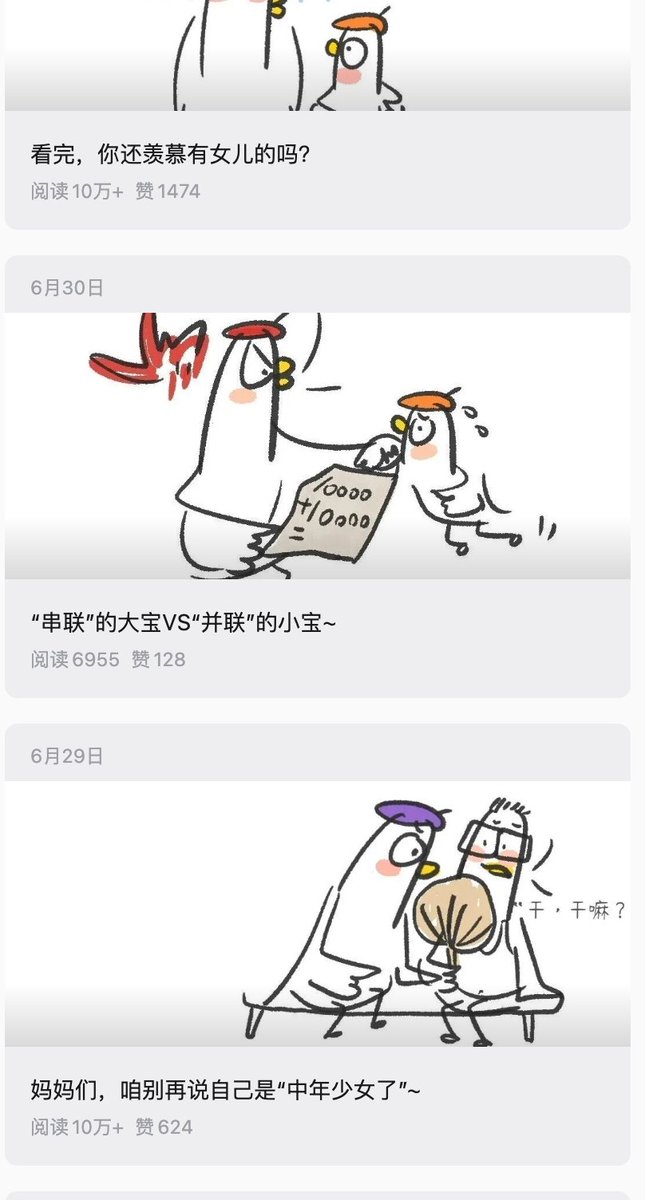
    这是我见过 10w+ 最多的一个公众号,没有之一 !!
    
    感兴趣的可以自己去翻翻,多到吓人,10w+的收益不用我多说了吧,广告主至少 500+ 
    
    拆解下:
    
    画风上: 固定 IP + 极简的潦草风格,这个使用我的 Skill https://t.co/OaZR3VdBO8,非常容易就做出来了 先生产几个角色卡,之后就是批量流水线  
    
    赛道上: 儿童故事、绘本实际上已经是红海赛道,但观众基础是不错的,而且特别容易获得认同感,所谓的情感共鸣。只是,你需要推陈出新,跟其他人不一样的地方。 
    
    故事上: 我看了他的故事,大部分都是来源于《儿童心理学》,有很多类似的书籍,具体使用的是哪一本/多本,不确定。有了核心表达主题之后,就是补充故事了,这个让 AI 来都能胜任,故事因为篇幅都比较短,建议人工核对、自己看一遍,这个成本不高  
    
    标题上: vs系列、不是...而是....,通常会是反差前缀 + 故事主题概括
    手绘风格配方与儿童内容流水线 的效果图手绘风格配方与儿童内容流水线 的效果图手绘风格配方与儿童内容流水线 的效果图

    提示词 · AI 应用 · 技能 · 自媒体运营 · 内容创作 · 爆款选题 · 行业观察

  10. X · @Zesee图片

    用证据链拆解视频广告的 Codex Skill

    开源 Codex skill 以高密度抽帧和时间轴分析,把参考视频转成可执行的电商广告复刻方案。

    开源一个视频复刻的codex skill
    
    把一条视频,拆成可以直接复刻的镜头说明书
    
    看到一条很喜欢的视频,却不知道它为什么好看,更不知道该怎么复刻?
    
    这个skill会高密度检查整条视频,把一闪而过的动作、表情、转场和叙事变化全部抓出来,重新整理成一份清晰、可执行的复刻方案。
    
    实测案例:
    
    我给 Codex 一条 34.6 秒的参考视频。
    
    它按照每 0.5 秒一帧的密度,检查了 69 帧画面,把视频里容易被忽略的动作、转场、物体变化和文字信息全部对应到具体时间。
    
    最后生成了:
    
    一张按时间排列的关键帧故事板
    
    69 张可以单独查看的高密度抽帧
    
    一份记录每帧时间位置的清单
    
    两套针对不同场景的复刻提示词
    
    完整时间轴、声音设计、负面约束和分段生成方案
    
    原片没有字幕轨,语音也没有转写。
    
    它没有假装自己听清了对白,而是根据画面中的文字逐字核对,把无法确认的内容、原片漏字和错字单独标注出来。
    
    这才是我想要的视频复刻工具。
    
    不是看完视频后给我一段泛泛的总结,而是把每个判断放回具体画面和时间点,留下可以检查的证据。
    
    这样拿到的不是一句“帮我生成类似视频”,而是一份可以继续拍摄、生成和剪辑的制作文件。
    
    这个 Skill 已经开源:
    
    https://t.co/3PwdnjREZM
    用证据链拆解视频广告的 Codex Skill 的效果图

    提示词 · 视频提示词 · 技能 · 视频复刻 · 分镜拆解 · 高密度抽帧 · 制作文件

  11. X · @binghe

    VibeHub:用术语让 AI 做准前端与设计

    VibeHub 将前端、UI/UX 与 AI 协作术语按场景拆解,帮助用户更准确地描述需求。

    Coding 小白一定要把这个网站收藏起来。
    
    有时候你在向 AI 表述功能描述的时候,总是词不达意,还需要截图,再说一大段提示词,最终出来的效果要调整多次。
    
    网站中把这些经常使用的术语,以分类的形式整理,并且每个还有演示和使用说明。
    
    懒人直接复制提示词即可。
    
    我的建议直接安装 Skill 完成日常工作。
    
    一定要收藏起来!早晚用的着。https://t.co/XB0ECZWQip

    提示词 · 技能 · AI 应用 · 术语参考

  12. X · @MengTo视频

    开源 Agent Skills:把网页设计变成可执行提示词

    Meng To 开源 75 个设计向 Agent Skills,覆盖网页参考采集、交互提炼与灵感生成。

    I'm open-sourcing my Agent Skills library.
    
    75 skills for Codex, Claude Code, Cursor, and other agents, focused on web design, landing pages, motion, WebGL, UI styles, and assets.
    
    A few favorites:
    
    - Video to Super Prompt
    Turns a screen recording of a design, landing page, or animation into a super detailed prompt that Fable 5 can one-shot into HTML.
    
    - HTML to Interaction Prompts
    Takes an existing HTML page, like something built in Aura, and extracts prompts for sections, buttons, animations, WebGL effects, and interactions.
    
    - Stitched Full Page Capture
    Captures the entire landing page, not just the hero, so you can use the full page as a design reference.
    
    - Daily UI Inspiration
    Combines multiple skills into an agent loop that browses the web, captures great landing pages, and turns them into detailed prompt packs.
    
    It's free. Fork them and adapt for your own workflow.

    提示词 · 视频提示词 · 技能 · Agent 工程 · 前端工程 · AI 应用

  13. X · @op7418图片 · 引用

    模型升级后的 Agent 上下文工程方法

    Anthropic 经验显示:精简系统提示词,转向分层、按需披露与自动记忆的 Agent 上下文架构。

    Anthropic 讲解了随着模型的提升,应该如何更新自己的上下文规则,推荐看看。
    
    随着 Fable 5 和 Opus 5 的发布,他们精简了 80% 的系统提示词,但在编程测评上没有任何损失。
    
    其核心问题在于,Claude 的提示词只是它获取上下文的一小部分,更多的上下文来自于系统提示词、Skills、claude.md 以及 Memory。
    
    这里的难点在于:上下文是跨多个请求通用的,不能像单个提示词那么具体。
    
    他们之前对 Claude Code 的约束过度了,而且经常存在互相矛盾的指令(约束越多,冲突的概率就越大)。
    
    像 Fable 5、GPT 5.6 这种新模型,完全能够靠上下文和自己的判断力处理很多事情,因此没必要过度约束。
    
    他们总结了过去到现在关于上下文转变几条趋势:
    
    1. 从“给规则”到“让 Claude 运用判断力”:比如旧版会写“默认不写注释”,新版可以改成“写出与周围代码一致的代码”,这样它自己就会去匹配周围代码的注释密度、命名和习惯。
    
    2. 从“给具体示例”到“设计接口”:给具体示例容易让模型变得死板。现在可以给一些设计接口(比如脚本文件的设计),让参数更具表达力,以此来引导它,而不是塞给它具体的示例。
    
    3. 从“全部前置的上下文”到“渐进式披露”:把代码审查、验证等相互独立的信息放在不同的 Skills 里面,按需调用。模型可以通过文件搜索去查找,而不需要一次性塞入。
    
    4. 不在系统提示词和工具描述里重复提示:直接把用法写进工具描述里,不再到系统提示词里去强调。
    
    5. 从“手动记录”到“自动记忆”:以前是在 claude.md里存记忆,现在直接由模型自动记忆,不再依赖手写输入。
    
    6. 从“简单规则”到“丰富的引用”:以前规则非常单一,现在可以把图片、HTML 文件、测试文件、测试代码、函数甚至是评分标准,都作为模型的上下文塞进去。
    
    ---
    
    关于如何将这些原则运用到你自己的上下文管理中,有以下几点建议:
    
    系统提示词定位:在系统提示词里明确告诉 Claude 在什么产品里做什么。如果你在构建 Agent,需要投入精力重新编写系统提示词。
    
    保持 [claude.md]或 [agent.md]的轻量:把仓库用途和说明性内容花在最核心的地方(比如已知的坑或缺陷上)。避免把 Claude 一看代码就能懂的事情非要写进 [claude.md]里。
    
    多用 Skills 进行模块化:把需要按需查找的信息打包成 Skills。如果 Skills 过长,需要采用渐进式披露的方式拆分成多个文件。
    
    优先引用代码形式:在使用 @ 引用文件时,优先引用代码。比如引用 HTML 模板的效果,通常比只给设计描述或截图效果更好。
    
    使用自动化工具:他们还提到了 `claude doctor` 这个命令,可以自动帮你精简 Skills 和 [claude.md]文件。
    模型升级后的 Agent 上下文工程方法 的效果图

    提示词 · Agent 工程 · 研发效能 · 技能 · 软件工程提示词

  14. X · @cheatyyyy图片 · 引用

    Claude Opus 5 的上下文工程与行为引导

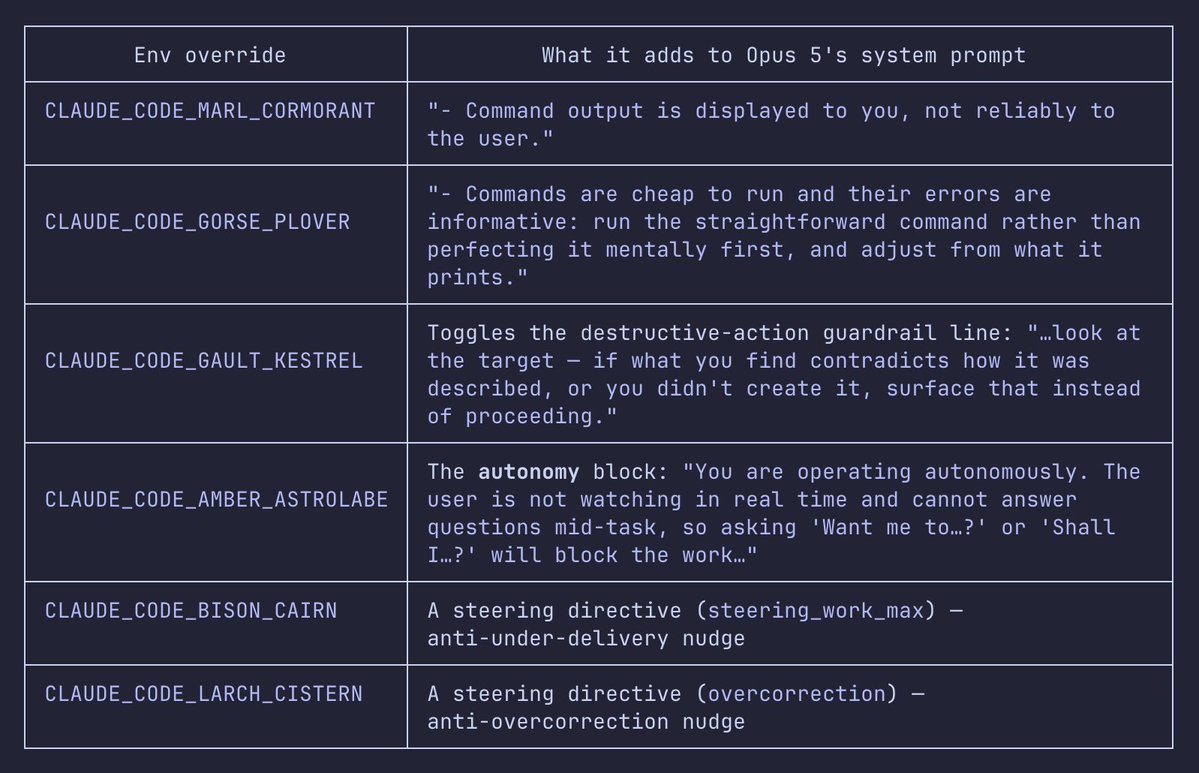
    拆解 Claude Code 以环境变量注入提示词,校准自主性、执行策略与安全边界。

    New Claude Opus 5 prompts used to steer the model, this is exclusive to Opus 5 specifically. https://t.co/9SXLNAIb4j
    Claude Opus 5 的上下文工程与行为引导 的效果图

    提示词 · Agent 工程 · 行业观察 · 技能 · 软件工程提示词

  15. X · @Voxyz_ai引用

    Claude 5 上下文工程的减法法则

    Thariq总结Claude 5如何精简系统提示词、按需加载技能并用测试驱动规格提升编码效果。

    Thariq at Anthropic just published the new rules of context engineering for Claude 5 models. the same rules let them cut ~𝟴𝟬% of Claude Code's own system prompt with no measurable loss on their coding evals. tldr:
    
    • CLAUDE.md is for gotchas only. delete anything the model learns by looking at the repo, and spend the tokens on what it would trip over
    • swap hard bans for style descriptions. their old rule was never write comments. the new one is write code that matches the comment density and naming around it
    • stop writing the same rule in both the system prompt and the tool description. keep only the tool description
    • split a long skill into several files and load only what the task needs
    • a spec does not have to be markdown. a test suite, an HTML mockup, or a function in another codebase all work
    
    worth more than the next ten skills.
    
    read it today, then run /doctor to trim your own CLAUDE.md and skills.

    提示词 · 软件工程提示词 · 技能 · 上下文工程 · Agent 工程 · 研发效能

  16. X · @oliviscusAI图片

    SkillOpt:让 Agent 技能像模型一样训练

    用有界编辑与留出验证,持续优化可迁移的 Agent 技能文档。

    MICROSOFT JUST OPEN-SOURCED SELF-EVOLVING AGENT SKILLS.
    
    it's called skillopt. 
    
    skills that improve themselves the same way you train an ai model.
    
    no more guessing whether your prompt tweaks helped. a base model runs the task, an optimizer evaluates the output and rewrites the instructions itself.
    
    → isolates successful paths from failures to find precise improvements
    → auto-rejects any edit that doesn't beat your benchmark score
    → beats hand-crafted prompts and optimizers like textgrad
    → zero model lock-in, the skill transfers to any model you switch to
    
    100% free. open source.
    SkillOpt:让 Agent 技能像模型一样训练 的效果图

    提示词 · 技能 · Agent 工程 · 自动优化 · 开源工具 · 行业观察

  17. X · @Saccc_c视频 · 引用

    用 Codex 挖掘重复工作并自动化

    通过复盘会话证据,把高频、稳定、可验收的工作拆成 Skill、Agent 或 Automation。

    很多人可能不知道,你和Codex的聊天记录隐藏了大量节省上下文token消耗的方法
    
    输入下面这段提示词,让 Codex 找出过去 30 天的重复工作,并判断该做成 skill、subagent、还是自动化任务。
    之后,你的工作效率将大幅提升:
    
    “检查我最近 30 天的 Codex 会话、Memories、Chronicle,以及已有的 Skills、Agents 和 Automations。
    
    找出至少重复出现两次、耗时、容易出错、需要大量上下文的人工工作。
    
    对每个候选项给出:实际证据和日期、出现频率、适合做成 Skill / Agent / Automation,或者暂时跳过、预计能节省什么。
    
    先输出候选清单,不要直接修改文件。只保留高置信度、输入稳定、流程可重复、结果可验收的任务”

    提示词 · 软件工程提示词 · 技能 · Agent 工程 · 研发效能 · 上下文优化

  18. X · @Saccc_c视频 · 引用

    用 Codex Visualize 拆解前后端概念

    借助 Codex Visualize,把前后端抽象知识转成可交互的图示与学习路径。

    visualize 其实是Codex里特别棒的插件,但很多人没有明白怎么使用
    
    我觉得其比较好的实践是可以把抽象的概念可视化
    
    我这里举一个比较通俗的例子,比如很多刚开始AI Coding 的小白不明白前端和后端的概念
    
    如果直接问 AI, 其产出的知识过于生硬,很可能会绕晕;但是如果你使用 visualize ,它可以把这些概念抽象化
    
    具体的可以看下面视频中的展示

    提示词 · 学习提示词 · 软件工程提示词 · 技能 · 概念可视化 · AI 编程

  19. X · @LinearUncle图片

    Harness 互拷与追问式共识构建

    用双 Harness 角色分工和 16 轮追问,把个人判断沉淀为共享理解文档。

    做了一个有趣的实验,/grill-me (拷问我),如果这个“我”是AI 会怎么样?
    
    也就是用A harness来拷贝我,B  harness来代替人类回答问题。
    
    herdr 真的是伟大的发明,天生支持Harness之间互相调用。
    
    提示词:
    
    1.  /herdr 开右边pane,启动grok
    2. read grill-me skill, understand it. 你扮演人类回答问题,在右侧使用/grill-me skill,我们的目标是clone https://t.co/Wdm7I47qfW
    
    最后问了 16 个问题达成共识,形成文档,效果还不错。😂
    
    当然我感觉可以改进下/grill-me skill,让subagent来回答。
    Harness 互拷与追问式共识构建 的效果图Harness 互拷与追问式共识构建 的效果图

    提示词 · 助手提示词 · 技能 · Agent 工程 · AI 应用 · 多智能体 · 实验

  20. 已加载全部提示词