正在打开每日关注
用 Pro 对话规划,再交给 Codex 写代码
介绍通过插件授权与一键交接,将 Pro 对话上下文传给 Codex 完成编码。
来源摘录
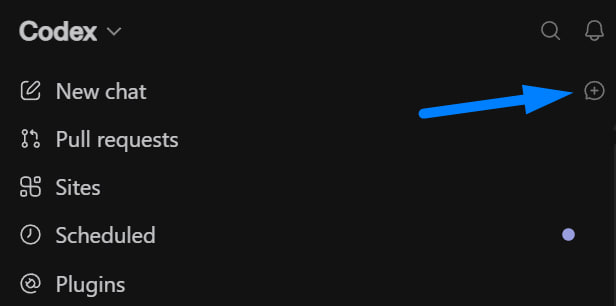
How to connect Sol 5.6 Pro to Codex and write code with the strongest model OpenAI has Sol Pro talks the task through with you in a normal chat, then hands the whole conversation to Codex with one button, and Codex writes the code. Four steps below. 1. On the ChatGPT site: Settings → Plugins → GitHub (screenshot 1). 2. In Codex, click the icon from screenshot 2. It opens a plain chat, and that is where Pro mode gets switched on. 3. From there you just talk until the plan holds up. 4. When you are done, hit Add to Codex at the top and the whole conversation moves across (screenshot 3). Sol Pro thinks, Codex types. P.S. Sol Pro is only on the Pro and ProLite plans, and it burns its own limit, not your main Codex pool.



深度解析
是什么 这条推文介绍一种双阶段 Agent 开发流程:先在 ChatGPT 的普通对话中使用 Sol 5.6 Pro 讨论需求、澄清目标并反复打磨计划,再通过 Codex 顶部的 Add to Codex 将完整上下文交给编码代理执行。GitHub 插件负责提供已认证的账户连接,截图也展示了插件权限、Codex 侧边栏和交接后的思考状态。
核心设计 价值不在单次代码生成,而在角色分工与上下文连续性:强规划模型负责理解问题和收敛方案,Codex 负责把已确认的计划转成代码。这样的流程降低了直接让编码 Agent 猜需求的概率,也把需求讨论、方案验证、实现执行串成一条可操作链路。
关键洞察 它体现了 Agent 产品从单一聊天窗口走向多表面协作的趋势。一键交接是关键交互,减少复制粘贴和重新解释;额度隔离则让用户能分别管理规划模型与 Codex 的使用成本。
边界与风险 原文没有证明 Sol 5.6 Pro 的实际代码质量、交接是否始终保留全部上下文,也没有说明 GitHub 权限的最小范围。套餐限制、名称和可用性应以当前产品界面为准。整体更像产品工作流经验分享,而非经过验证的工程基准。